Remote Storage
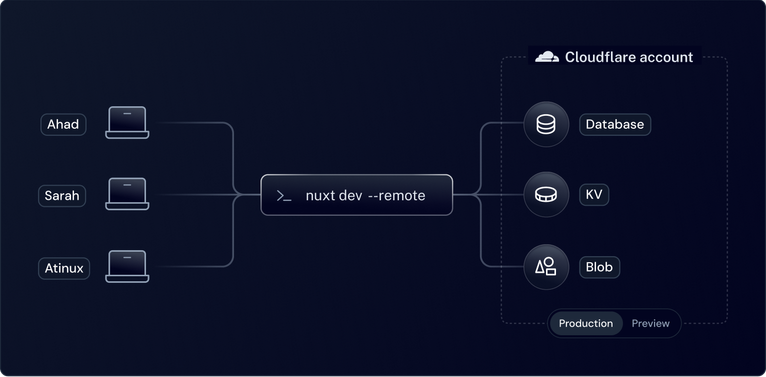
One of the main features of NuxtHub is the ability to access your remote storage from your local environment or from external Nuxt projects. This is made possible by our secured proxy system.
There are two ways to use the remote storage:
- Local development: Access your remote storage from your local environment, useful for sharing your database, KV, and blob data with your team or work with your production data.
- External Nuxt projects: Access your remote storage from another Nuxt project, useful if your frontend is deployed on a different hosting platform and you want to use your NuxtHub project as a backend.
Local Development
Set Project Secret Key
To setup your deployed project to accept remote storage from your local project, you first need to set the NUXT_HUB_PROJECT_SECRET_KEY environment variable in your deployed project settings.
Make sure to redeploy your project to apply the changes.
Next, you need to set the NUXT_HUB_PROJECT_SECRET_KEY in your local .env file.
NUXT_HUB_PROJECT_SECRET_KEY=<my-project-secret-key>
Set the Project URL
Use the hub.projectUrl option to set the URL of your deployed project based on the local environment:
export default defineNuxtConfig({
  // Apply only in development
  $development: {
    hub: {
      projectUrl ({ env, branch }) {
        // Select the preview URL from the dev branch
        if (env === 'preview') {
          return 'https://dev.my-project.nuxt.dev'
        }
        return 'https://my-project.nuxt.dev'
      }
    }
  }
})
env is production when branch is main, otherwise it's preview.Start your Nuxt project
npx nuxt dev --remote
npx nuxt dev --remote=production
npx nuxt dev --remote=preview
The development project will now use the remote storage from your deployed project and these logs should happen in your terminal:
ℹ Using production environment
ℹ Using remote storage from https://my-project.nuxt.dev
ℹ Remote storage available: database, kv, blob
To always use the remote storage in your local project in development, you can use the remote option in your nuxt.config file:
export default defineNuxtConfig({
  // Apply only in development
  $development: {
    hub: {
      remote: true // or 'production' or 'preview'
    }
  }
})
remote option in your nuxt.config file in production if you are deploying your project using NuxtHub Admin, Cloudflare Pages or Cloudflare Workers. Use it in production only when you are connecting from external Nuxt projects.External Nuxt Projects
It is possible to use the remote storage from another Nuxt project. This can be useful if your frontend is deployed on another hosting platform and you want to use your NuxtHub as your backend.
To access your remote storage from another Nuxt project:
- Install
@nuxthub/coreto your project:
pnpm add @nuxthub/core
yarn add @nuxthub/core
npm install @nuxthub/core
bun add @nuxthub/core
- Add it to the
modulessection in yournuxt.configand set theremoteoption totrue:
export default defineNuxtConfig({
  modules: ['@nuxthub/core'],
  hub: {
    remote: true
  }
})
- Add the
NUXT_HUB_PROJECT_URLandNUXT_HUB_PROJECT_SECRET_KEYenvironment variables to your project:
NUXT_HUB_PROJECT_URL=https://my-nuxthub-project.pages.dev
NUXT_HUB_PROJECT_SECRET_KEY=my-project-secret-used-in-cloudflare-env
If you haven't, set the NUXT_HUB_PROJECT_SECRET_KEY environment variable in your NuxtHub deployed project and make sure to redeploy.