Nuxt SQL Database
NuxtHub Database provides a type-safe SQL database powered by Drizzle ORM, supporting PostgreSQL, MySQL, and SQLite with smart detection and automatic migrations at build time.
Getting started
Install dependencies
Install Drizzle ORM, Drizzle Kit, and the appropriate driver(s) for the database you are using:
pnpm add drizzle-orm drizzle-kit postgres @electric-sql/pglite
yarn add drizzle-orm drizzle-kit postgres @electric-sql/pglite
npm install drizzle-orm drizzle-kit postgres @electric-sql/pglite
bun add drizzle-orm drizzle-kit postgres @electric-sql/pglite
deno add npm:drizzle-orm drizzle-kit postgres @electric-sql/pglite
npx nypm add drizzle-orm drizzle-kit postgres @electric-sql/pglite
- Uses
PGlite(embedded PostgreSQL) if no environment variables are set. - Uses
postgres-jsdriver if you setDATABASE_URL,POSTGRES_URL, orPOSTGRESQL_URLenvironment variable. - Use
neon-httpdriver with@neondatabase/serverlessfor Neon serverless PostgreSQL.
pnpm add drizzle-orm drizzle-kit mysql2
yarn add drizzle-orm drizzle-kit mysql2
npm install drizzle-orm drizzle-kit mysql2
bun add drizzle-orm drizzle-kit mysql2
deno add npm:drizzle-orm drizzle-kit mysql2
npx nypm add drizzle-orm drizzle-kit mysql2
- Uses
mysql2driver if you setDATABASE_URLorMYSQL_URLenvironment variable. - Requires environment variable (no local fallback).
pnpm add drizzle-orm drizzle-kit @libsql/client
yarn add drizzle-orm drizzle-kit @libsql/client
npm install drizzle-orm drizzle-kit @libsql/client
bun add drizzle-orm drizzle-kit @libsql/client
deno add npm:drizzle-orm drizzle-kit @libsql/client
npx nypm add drizzle-orm drizzle-kit @libsql/client
- Uses
libsqldriver for Turso if you setTURSO_DATABASE_URLandTURSO_AUTH_TOKENenvironment variables. - Uses
libsqllocally with file at.data/db/sqlite.dbif no environment variables are set.
Set SQL dialect
Enable the database in your nuxt.config.ts by setting the db property to your desired SQL dialect:
export default defineNuxtConfig({
  hub: {
    db: 'postgresql'
  }
})
export default defineNuxtConfig({
  hub: {
    db: 'mysql'
  }
})
export default defineNuxtConfig({
  hub: {
    db: 'sqlite'
  }
})
Database schema
Create your database schema with full TypeScript support using Drizzle ORM:
import { pgTable, text, serial, timestamp } from 'drizzle-orm/pg-core'

export const users = pgTable('users', {
  id: serial().primaryKey(),
  name: text().notNull(),
  email: text().notNull().unique(),
  password: text().notNull(),
  avatar: text().notNull(),
  createdAt: timestamp().notNull().defaultNow(),
})
import { mysqlTable, text, serial, timestamp } from 'drizzle-orm/mysql-core'

export const users = mysqlTable('users', {
  id: serial().primaryKey(),
  name: text().notNull(),
  email: text().notNull().unique(),
  password: text().notNull(),
  avatar: text().notNull(),
  createdAt: timestamp().notNull().defaultNow(),
})
import { sqliteTable, text, integer } from 'drizzle-orm/sqlite-core'

export const users = sqliteTable('users', {
  id: integer().primaryKey({ autoIncrement: true }),
  name: text().notNull(),
  email: text().notNull().unique(),
  password: text().notNull(),
  avatar: text().notNull(),
  createdAt: integer({ mode: 'timestamp' }).notNull(),
})
Generate migrations
Generate the database migrations from your schema:
npx nuxt db generate
This creates SQL migration files in server/db/migrations/{dialect}/ which are automatically applied during deployment and development.
db instance from @nuxthub/db.npx nuxt db generate to generate the database migrations each time you change your database schema and restart the development server.Local development
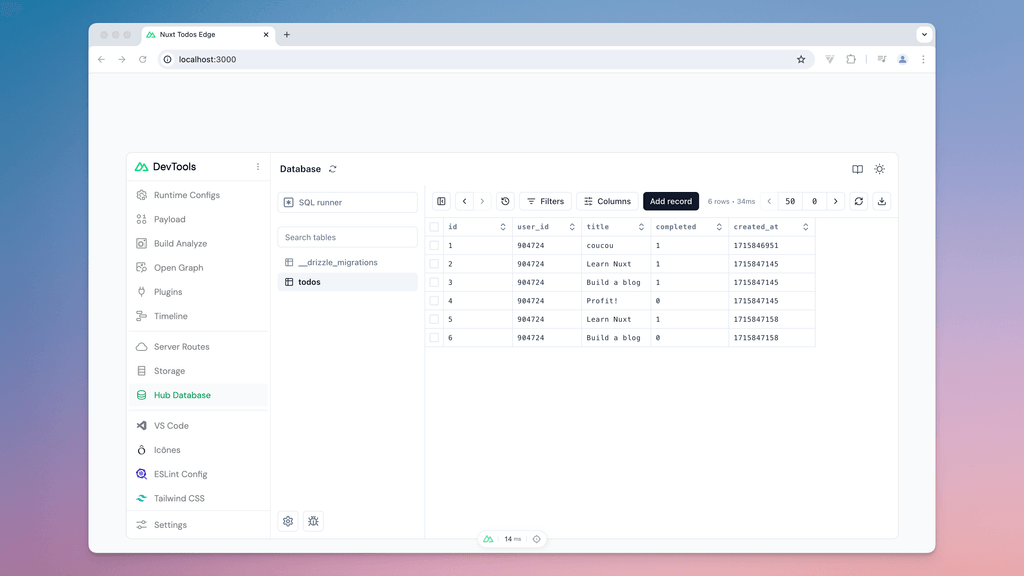
During local development, view and edit your database from Nuxt DevTools using the Drizzle Studio:
Build-time Hooks
export default defineNuxtConfig({
  hooks: {
    'hub:db:migrations:dirs': (dirs) => {
      dirs.push('my-module/db/migrations')
    }
  }
})
_hub_migrations table which are applied after the database migrations complete.export default defineNuxtConfig({
hooks: {
'hub:db:queries:paths': (queries, dialect) => {
queries.push('my-module/db/queries')
}
}
})
import { createResolver, defineNuxtModule } from '@nuxt/kit'

export default defineNuxtModule({
  setup(options, nuxt) {
    const { resolve } = createResolver(import.meta.url)

    nuxt.hook('hub:db:schema:extend', ({ paths, dialect }) => {
      paths.push(resolve(`./db/schema/pages.${dialect}.ts`))
    })
  }
})
Advanced configuration
For advanced use cases, you can explicitly configure the database connection:
export default defineNuxtConfig({
  hub: {
    db: {
      dialect: 'postgresql',
      driver: 'postgres-js', // Optional: explicitly choose driver
      connection: {
        connectionString: process.env.DATABASE_URL
      }
    }
  }
})
Column casing
Database model names often use snake_case conventions, while in TypeScript, it is common to use camelCase for naming models. To address this, you can use the casing option to automatically map camelCase JavaScript keys to snake_case in the database:
export default defineNuxtConfig({
  hub: {
    db: {
      dialect: 'postgresql',
      casing: 'snake_case'
    }
  }
})
This allows you to use camelCase in your TypeScript schema while Drizzle automatically maps them to snake_case in the database:
import { pgTable, text, serial, timestamp } from 'drizzle-orm/pg-core'

export const users = pgTable('users', {
  id: serial().primaryKey(),
  firstName: text().notNull(), // Maps to first_name in the database
  lastName: text().notNull(),  // Maps to last_name in the database
  createdAt: timestamp().notNull().default(sql`CURRENT_TIMESTAMP`) // Maps to created_at
})
D1 over HTTP
Use the d1-http driver to access a Cloudflare D1 database over HTTP when hosting on other platforms.
export default defineNuxtConfig({
  hub: {
    db: {
      dialect: 'sqlite',
      driver: 'd1-http'
    }
  }
})
This driver requires the following environment variables:
| Variable | Description |
|---|---|
NUXT_HUB_CLOUDFLARE_ACCOUNT_ID | Your Cloudflare account ID |
NUXT_HUB_CLOUDFLARE_API_TOKEN | A Cloudflare API token with D1 permissions |
NUXT_HUB_CLOUDFLARE_DATABASE_ID | The ID of your D1 database |
D1:Edit permissions.Neon Serverless
Use the neon-http driver to connect to Neon serverless PostgreSQL with HTTP protocol optimized for serverless environments.
export default defineNuxtConfig({
  hub: {
    db: {
      dialect: 'postgresql',
      driver: 'neon-http'
    }
  }
})
Install the required dependency:
pnpm add @neondatabase/serverless
yarn add @neondatabase/serverless
npm install @neondatabase/serverless
bun add @neondatabase/serverless
deno add npm:@neondatabase/serverless
npx nypm add @neondatabase/serverless
This driver requires the following environment variable:
| Variable | Description |
|---|---|
DATABASE_URL | Your Neon database connection string (or POSTGRES_URL / POSTGRESQL_URL) |
postgresql://user:password@hostname/database.Docker/Kubernetes Deployments
Build container images without database credentials by deferring environment resolution to runtime. Set the driver explicitly and disable automatic migrations during build and dev:
export default defineNuxtConfig({
  hub: {
    db: {
      dialect: 'sqlite',
      driver: 'libsql',
      applyMigrationsDuringBuild: false,
      applyMigrationsDuringDev: false
    }
  }
})
export default defineNuxtConfig({
  hub: {
    db: {
      dialect: 'postgresql',
      driver: 'postgres-js', // or 'neon-http'
      applyMigrationsDuringBuild: false,
      applyMigrationsDuringDev: false
    }
  }
})
export default defineNuxtConfig({
  hub: {
    db: {
      dialect: 'mysql',
      driver: 'mysql2',
      applyMigrationsDuringBuild: false,
      applyMigrationsDuringDev: false
    }
  }
})
Set these environment variables at runtime:
| Variable | Description |
|---|---|
TURSO_DATABASE_URL | Connection URL for Turso or libSQL. Falls back to LIBSQL_URL, then DATABASE_URL. |
TURSO_AUTH_TOKEN | Authentication token for remote databases. Falls back to LIBSQL_AUTH_TOKEN. |
| Variable | Description |
|---|---|
POSTGRES_URL | Connection URL for PostgreSQL. Falls back to POSTGRESQL_URL, then DATABASE_URL. |
| Variable | Description |
|---|---|
MYSQL_URL | Connection URL for MySQL. Falls back to DATABASE_URL. |
npx nuxt db migrate or your CI/CD pipeline.Read Replicas
NuxtHub supports read replicas using Drizzle ORM's withReplicas() feature for postgres-js and mysql2 drivers. When configured, read queries are automatically routed to replicas while write queries go to the primary database.
Configure replicas in your nuxt.config.ts:
export default defineNuxtConfig({
  hub: {
    db: {
      dialect: 'postgresql',
      replicas: [
        process.env.DATABASE_URL_REPLICA_1,
        process.env.DATABASE_URL_REPLICA_2
      ].filter(Boolean)
    }
  }
})
export default defineNuxtConfig({
  hub: {
    db: {
      dialect: 'mysql',
      replicas: [
        process.env.DATABASE_URL_REPLICA_1,
        process.env.DATABASE_URL_REPLICA_2
      ].filter(Boolean)
    }
  }
})
Cloudflare Hyperdrive
When using Cloudflare Hyperdrive, you first have to set up Hyperdrive in Cloudflare and set the generated ID in nuxt.config.ts:
export default defineNuxtConfig({
  hub: {
    db: {
      dialect: 'postgresql',
      connection: {
        hyperdriveId: '<your-hyperdrive-id>',
      },
    },
  },
})
If you want to apply migrations during build, you also need to set the direct database connection string in your environment variables. With this, NuxtHub will apply migrations on build to the configured database connection.
AI Agents
If you work with an IDE that supports AI agents, you can add the following text in your Agents.md or .cursor/rules file:
# Agent Instructions

/** ... your agent instructions ... */

## Database

- **Database Dialect**: The database dialect is set in the `nuxt.config.ts` file, within the `hub.db` option or `hub.db.dialect` property.
- **Drizzle Config**: Don't generate the `drizzle.config.ts` file manually, it is generated automatically by NuxtHub.
- **Generate Migrations**: Use `npx nuxt db generate` to automatically generate database migrations from schema changes
- **Never Write Manual Migrations**: Do not manually create SQL migration files in the `server/db/migrations/` directory
- **Workflow**:
  1. Create or modify the database schema in `server/db/schema.ts` or any other schema file in the `server/db/schema/` directory
  2. Run `npx nuxt db generate` to generate the migration
  3. Run `npx nuxt db migrate` to apply the migration to the database, or run `npx nuxt dev` to apply the migration during development
- **Access the database**: Use the `db` instance from `@nuxthub/db` (or `hub:db` for backwards compatibility) to query the database, it is a Drizzle ORM instance.
Migrating from v0.9
hubDatabase(), follow this migration guide.Configuration changes
The database option has been renamed to db and now accepts a SQL dialect instead of a boolean.
export default defineNuxtConfig({
  hub: {
-    database: true
+    db: 'sqlite'
  }
})
Valid dialects are sqlite, postgresql and mysql.
Directory changes
The database directory has been renamed from server/database/ to server/db/:
- server/database/schema.ts
+ server/db/schema.ts

- server/database/migrations/
+ server/db/migrations/
Make sure to move your schema and migration files to the new location.
API changes
The old hubDatabase() function has been removed. You must now use Drizzle ORM.
Before:
const db = hubDatabase()
const result = await db.prepare('SELECT * FROM users').all()
After:
const result = await db.select().from(tables.users)
Migration files
Your existing SQL migration files continue to work! Just move them to server/db/migrations/.